
Plot Grid: The Map to Conquer Your Story
As writers, we often find ourselves staring at the blank page or racing against a tight deadline. Let’s be honest—procrastination is our most faithful companion.
Waiting for inspiration can take longer than we can afford, which means sitting down to write becomes urgent. One tool I’ve recently started using while writing my latest novel (Project Agatha), and which has saved me countless hours and energy, is the Plot Grid.
In this article, you’ll learn what it is, how to create one, what advantages it offers, and you’ll even get a free template to download so you can start your next literary project.
What is a Plot Grid?
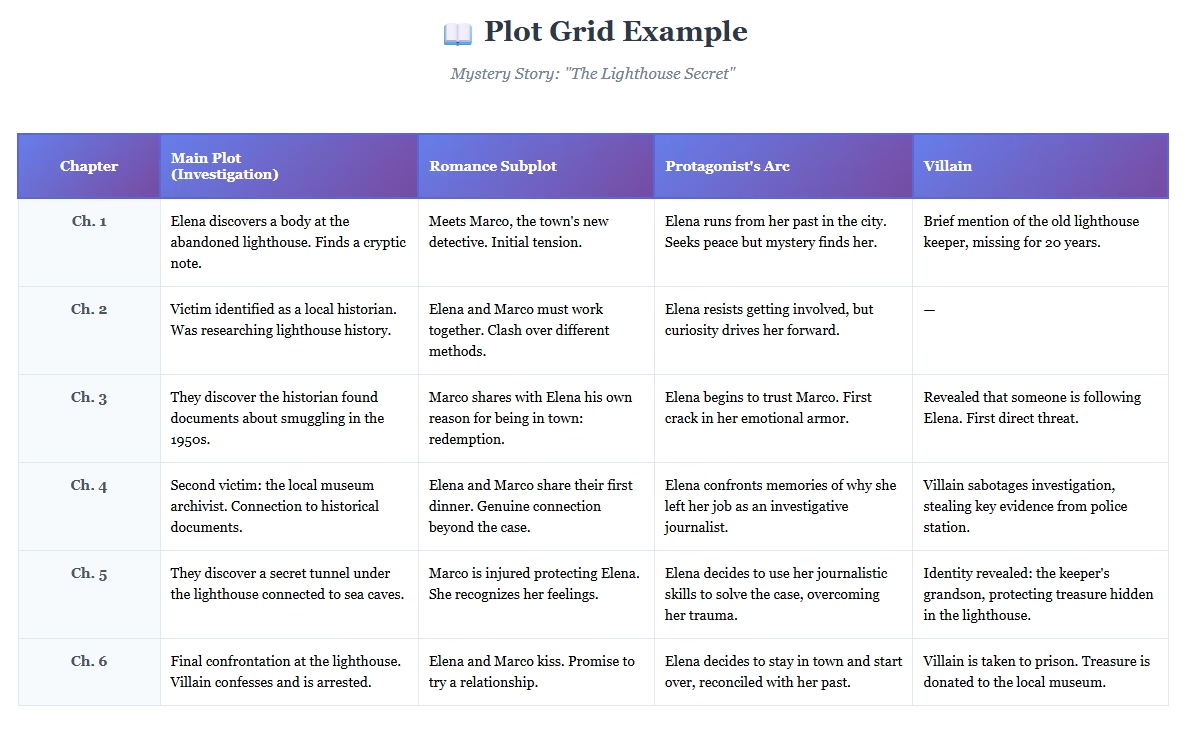
The simplest way to understand it is this: it’s a table with rows and columns where you develop your story’s plot and subplots. Rows represent chapters or scenes, while columns represent different storylines, characters, or thematic elements.
Think of it as a map where you briefly note what happens in each chapter or scene—whether related to the central plot or to each of the secondary stories and characters that make up your project. This allows you to visualize your story’s development, identify narrative gaps, and balance pacing and character progression.
While it’s difficult to pinpoint exactly when or who first started using the Plot Grid as a mapping tool, it has certainly gained popularity in recent years thanks to the abundance of software that makes creating these charts easy and clear. Authors like Nancy C. Walker and J.K. Rowling, creator of Harry Potter, have shared examples of how they use this tool and its benefits.
Personally, as someone who has been a pantser my entire life, I was initially skeptical about whether it would help. I can now say with conviction that it has saved me time, energy, and has significantly facilitated the development of my current literary work.
What Elements Make Up a Plot Grid?
One of the great advantages of using a Plot Grid is its visual simplicity. These are the elements you’ll use to create one for your own project:
Rows: These represent the scenes or chapters of your novel or screenplay. Each row is a narrative unit of your story.
Columns: Here you’ll place the different storylines of your project. This can include the main plot, your story’s structure (for example, the hero’s journey or the ABDCE structure), subplots, or character arcs.
Cells: Each cell in the table is the intersection of a row and a column. In it, you’ll briefly write what happens in each chapter or scene in relation to each storyline. For example: “Protagonist discovers the first clue” or “First conflict with the mentor.”
The image shows a simple Plot Grid example that can help you understand the concept easily.
How to Create a Plot Grid?
1. Choose Your Tool
First, you’ll decide where you want to create your Plot Grid. Some authors use programs like Excel, Google Sheets, or Notion. Others prefer paper or a whiteboard. I, for instance, made my first Plot Grid in Scrivener because it’s my preferred writing tool at the moment.
2. Define Your Rows and Columns
Although it may seem overwhelming at first, it’s important to decide how many scenes or chapters you’ll have (rows), as well as which storylines (columns). Don’t worry—you can always modify it along the way.
Start simple, with perhaps four or five chapters, one column for your main plot, and a subplot, which could be your protagonist’s or villain’s arc.
3. Main Plot
Begin filling in the cells of your story’s central storyline. Add as many rows as you need as you define more scenes or chapters.
4. Incorporate Other Subplots
Once you have your main plot defined, continue adding columns for subplots or secondary characters. This will allow you to see how all your story’s narrative threads interweave.
5. Review and Adjust
Once your initial table is complete, review it and make sure there are no holes in your story. Pay attention to important aspects like pacing and the progression of each storyline.
6. Continuous Updates
The Plot Grid is a living tool. You start with one, but it evolves as you progress in your writing. Don’t be afraid to remove or add whatever is necessary to make your story work.
Why Should You Use a Plot Grid in Your Project?
This isn’t an attempt to turn you into a plotter—far from it. The Plot Grid is a tool with multiple benefits that can save you headaches when it comes to writing your next novel or screenplay. Here are some key advantages:
Complete Story Visualization: Seeing your entire narrative at a glance allows you to identify patterns, problems, and opportunities that would be invisible when reading the manuscript linearly. It’s like having a map of the entire territory instead of wandering blindly.
Pacing Control: By observing the distribution of important events in your table, you can ensure your story maintains appropriate pacing. You avoid both reader exhaustion from too much action and boredom from lack of progression.
Plot Balance: The Plot Grid immediately reveals if a subplot disappears for several chapters or if a secondary storyline is monopolizing attention when it should be complementary. You can adjust the weight of each narrative element.
Problem Detection: If a row has many empty cells, that chapter probably isn’t moving the story forward significantly. This helps you identify sections that need to be trimmed, merged, or enriched.
Facilitates Editing: During revision, the Plot Grid helps you decide which scenes to keep, modify, or eliminate. If a scene doesn’t contribute to any important storyline, it can probably be removed without affecting the story.
Combats Blank Page Syndrome: When you know exactly what should happen in each chapter and how each element connects to the rest, sitting down to write becomes much less intimidating. You have a clear map to follow.
Conclusion
The Plot Grid is a tool that transforms how you approach writing your novel or screenplay: it allows you to visualize the complete structure, balance plots and characters, and detect problems before they become obstacles.
If you’re looking for clarity, efficiency, and a practical guide to move forward with your project, the Plot Grid can be your best ally. I invite you to try it and discover how it can facilitate your creative process and help you overcome the dreaded blank page.
Don’t forget to download the free Plot Grid template I’ve prepared for you. With it, you can start mapping your next story immediately and experience firsthand the benefits of this powerful tool.